

绘展王年会(EKAM)官网
Exhibitor Registration
Select an exhibition booth plan, submit your application online. The organizing committee will assign booths based on application order and provide scheduling details simultaneously.
Why Exhibit
Showcase your brand, launch products, and connect with buyers at the same exhibition to reach professional attendees and procurement teams across the event industry.
- Connects professional attendees across the exhibition industry's supply chain, focusing on buyer-seller matching scenarios.
- 展位类型覆盖背板、简易、标准与光地展位,便于按展示形式与预算选择
- Boost visibility with concurrent theme forums and new product launches.
- End-to-end exhibition support and on-site coordination, from application to display setup

Booth Proposal
Fees are based on the "Audience and Exhibitor Fee Schedule" issued by the Organizing Committee. Specifications and configurations are subject to confirmation by the Organizing Committee.
Booth Map & Online Selection
选择展位方案后,展位图只显示对应编号前缀的展位(背板展位对应 G 开头、简易展位对应 J 开头、标准展位对应 B 开头、光地展位对应 T 开头),在会场平面图上直接点击展位区域即可选择意向展位(支持多选)。
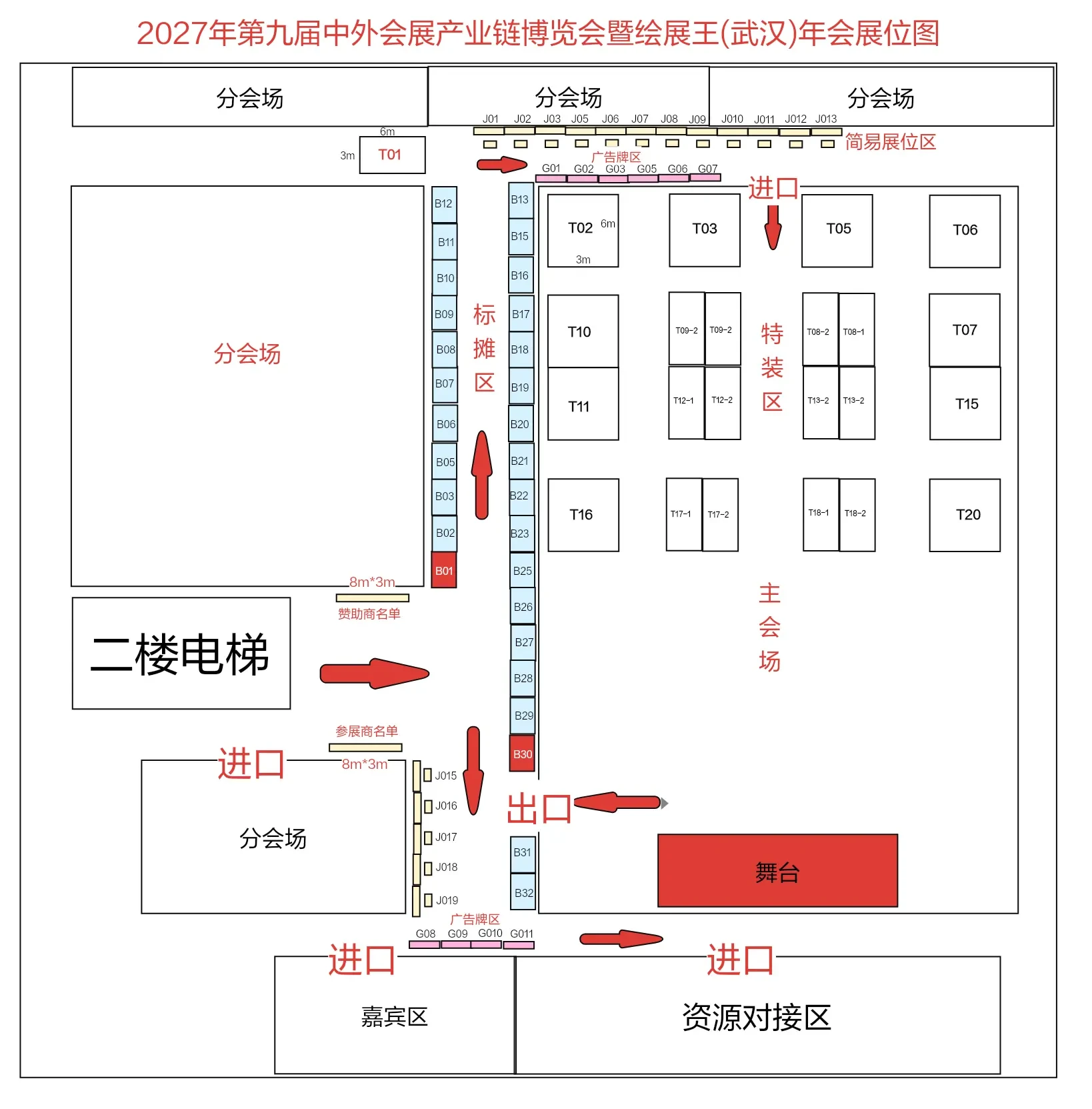
可预订汇总
Booth Plan and Number Prefix
- Backwall BoothG 开头对应 G 开头展位,长 3m × 宽 2m
- Simple BoothJ 开头对应 J 开头展位,长 3m × 宽 2m
- Standard BoothB 开头对应 B 开头展位,长 3m × 宽 2m
- Floor StandT 开头对应 T 开头展位,36 ㎡ / 个,自行搭建
点击平面图上的展位区域或下方展位号即可选择意向展位,支持同时选择多个展位(悬停或选中时展位号会显示在图上对应位置);提交参展申请后所选展位即刻锁定 30 分钟,其他企业无法再选择,锁定到期未支付将自动释放,支付成功后自动转为已售出;手机上可点「放大选位」进入全屏放大模式,拖动查看并逐格点选,也可切换展区、按方案筛选或点「查看完整平面图」查看原图;展位编号与展位方案的对应关系依据组委会会场平面图,展位状态由组委会在管理后台维护Last updated on 2026-11-03 at 17:39Final booth location and fees are subject to the exhibition contract confirmed by the organizing committee.
选择展区与展位方案后,点击平面图上的展位区域或展位号,即可选择意向展位(支持多选),选定结果会带入参展申请表。
Exhibition Process
Complete your exhibition preparation in four stages: from application submission to on-site setup.
Submit Exhibition Application
Enter company information and select your desired exhibition zones and booth plans to submit your application.
Confirm Booth
The organizing committee will assign booths in order of application and provide booth numbers along with exhibition proposals.
Pay exhibition fees
Complete payment and sign the exhibition confirmation documents based on the confirmed booth plan.
Exhibition Setup
Proceed with on-site setup according to the exhibition schedule. The organizing committee will provide on-site support services.
Exhibition Setup Time:2027 1 3 – 4 8:00 – 18:00
Meeting Date: 2027/1/5 – 6; Check-in Time: 1/5 at 9:30 – 14:00
Complete the application, booth confirmation, and payment, then proceed to setup on time. Booth construction and power requirements must be reported to the organizing committee in advance and handled according to venue regulations.
Submit Exhibition Application
Enter company details and your preferred exhibition zones and booth plans. Booths will be assigned in the order submissions are received.
尚未确定展位方案?可先提交意向登记,组委会与您对接参展安排后再完成正式申请与缴费。
意向参展登记